Wednesday, 27 June 2018
In large letters he wrote the day’s subject on a stained and scarred whiteboard: “Word Processing Application”. Stepping back and inspecting his work, he scrubbed through the last word with a chalkboard eraser and rewrote it; then, capping the marker and exhaling, he turned around. His face was stern and impatient.
“Do you know it?” he asked shortly, gesturing widely at the board behind him.
“YES,” they answered in unison.
“What is it?”
The sea of eyes and faces, so vocal a moment before, shrank back in hesitating silence.
He took a straight-backed step towards the front row and asked again. “What is it? What is it?”
A slow breeze oozed in through the open windows, paused, and wandered out the other side of the classroom. There was a faint smell of dust and dirt, ink and paper, trash fires, and rain.
“Fidelity, what is it?” A girl in the second row flinched and stood up slowly, smiling meekly. Her eyes darted from the board to her closed notebook to the polished shoes of the man standing so tall in front of her. She breathed in, out, in – opened her mouth a bit – and then let it fall closed again.
Turning crisply from her, the teacher pointed to a thin boy intent upon the nearest corner of the bare concrete floor. “William, what is it?” Fidelity melted back down into her desk.
William stood up sharply with the air of someone for the fourth time searching their suitcase for toothpaste. His eyes bulged confusedly. “The combi – combination – of letter-”
“No.” The teacher waved downwardly at William and the 14-year-old sat gratefully. “You do not know it,” he said to the class. “That is Word Processing.” He pointed back at William. “What is Word Processing?”
William stood up again and recited, “Word Processing is the combination of letters, figures, and symbols to form words and sentences.”
The teacher nodded and started back towards the board. “Clap for him.” All together the students clapped a quick simple rhythm that shook the room’s gray silence.
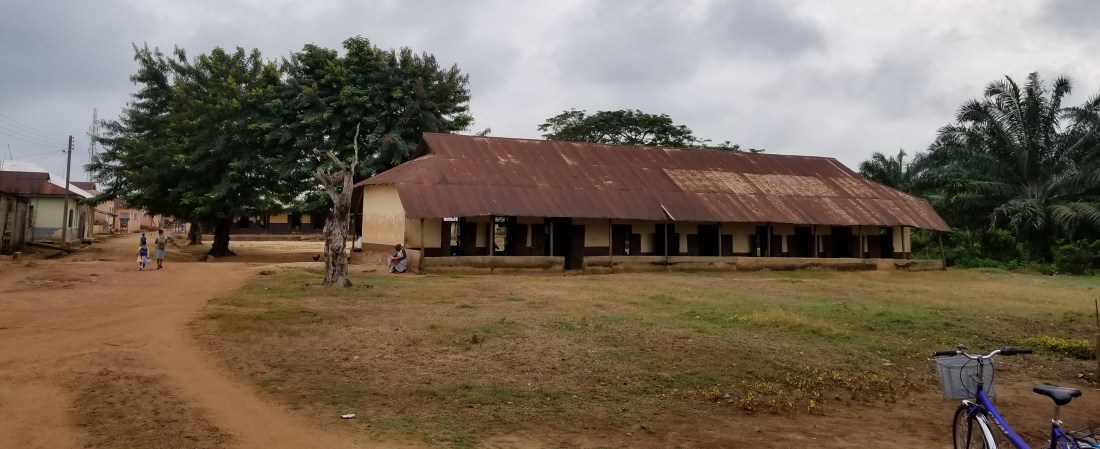
A short jog out the windows was an identical long structure of a schoolhouse in sectioned rooms. Its dull-painted cinderblock-and-plaster walls were broken in regular intervals by windows and doorways. The long tin roof above dripped and dried in the sunlight of a recent downpour. Between the schoolhouses was a wide field of trodden grass filled with blue-uniformed young schoolchildren. In packs they shrieked and ran and loitered chatting under the sparse shade trees. Above them, flitting from branch to branch to rusty tin, birds tweeted and sang. From the crossroads a few blocks away the percussive speech of a preacher on a loudspeaker boomed its way faintly through that twittering recess field to the classroom doorway.
Written on the whiteboard was the definition of Word Processing as said by William, the definition of Word Processing Application, and a short list of examples:
Word Processing is the combination of letters, figures and symbols to form words and sentences.
Word Processing Application is a computer programme that help us to create, edit and format a document.
Examples of Word Processing Application
1. Microsoft Word
2. Wordpad
3.
“What is another example?” The teacher raised his arms slightly. The response back was a dim confused muttering. He capped the marker. “How do we open an application? Don’t you know how?”
“YES.”
“You know the steps?”
“YES.”
“Alex, what are the steps?” He pointed to a tall young man with an athletic build in the back row.
Alex raised himself with a sideways glance at the students around him. “Click on All Progr-”
“Mary, what are the steps?”
Alex remained standing in disappointed silence, watching as Mary glanced back at him from the front. “Click on Start Menu. Click on All Programmes. Locate the application you want to use. Click on the application you want to use.”
The teacher nodded. “Clap for her.” Again the class clapped the applause rhythm as Alex and Mary sat back in their desks. On the board, the teacher wrote the steps. A few students read along out loud, as if from dim memory completing each word just before he finished writing it:
1. Click on Start Menu.
2. Click on All Programmes.
3. Locate the application you want to use.
4. Click on the application you want to use.
“Where are your keyboards? If you have not taken out your keyboards, do it now.”
The desks in the classroom were ancient and wooden. They were missing sides and crosspieces, and they creaked and groaned as the students shifted. Like tables in an old saloon, they had chunks and chips missing here and there, marks and stains on the seats as well as the desktops. The corners were dulled, the edges were rounded, and the oil and polish from years of young hands reflected dimly the light streaming in through the windows.
Each student pulled from these desks a sheet of white paper printed with the keys and buttons of a computer keyboard. Some had doodled and sketched on the printed image, drawing cars and dresses and circling the letters of their name.
“Say the steps together.”
“CLICK ON START MENU. CLICK ON ALL PROGRAMMES. LOCATE THE APPLICATION YOU WANT TO USE. CLICK ON THE APPLICATION YOU WANT TO USE.”
“Are you getting it?”
“YES.”
“Are you getting it?”
“YES.”
“Are you getting it?”
“YES.”
“Okay. Copy all of this into your notebooks.”
He patrolled the classroom as the students, heads down, crowded their notebooks in a meticulous effort of checking and copying every letter on the whiteboard as well as they could. Some with tongues out a bit, some holding their pens at wild and weird angles, they paused as he passed, at the same time trying to hide their penmanship from him and bracing for a comment. He said nothing.
After ten minutes, he returned to the front, marker in hand. “While you finish, I will write your homework on the board. Copy this down too.”
Homework: List 6 examples of Word Processing Applications.

 Tim in Ghana: A Look into the Life of a Peace Corps Volunteer
I know why there aren’t yet any comments on this one. It’s hard to know how to react, what to share in the comment section without sounding flippant. How can this exist in the same world as ours? And more importantly, how can I be so ignorant that it does? This is so very eye-opening, and all I can say is ‘Thank you, Tim’. You are opening our eyes to not only another culture, but another world. Blessings to you, Tim, as you continue on in your insightful revelations. Love always.
Mom
LikeLike
Tim you are giving them the world that they had not been shown before. Take them beyond the text book. I’m sure they are so excited to attend blue eyed Mr Sump’s classroom. I like how you address them all by name. Also, I doubt they know how a rocket is able to enter space? (On a high level of course) Best!!!
LikeLike
Thanks, Aunt G! I like the creative take on the post, but actually I was not the teacher here. I was observing the lesson. But I might have made that confusing. Oops!
LikeLike
Reminds me of this story I heard awhile back! https://www.npr.org/sections/goatsandsoda/2018/03/01/589519475/computer-teacher-with-no-computers-chalks-up-clever-classroom-plan
LikeLike